AI Headshot Generator Guide: Create Studio-Quality Photos at Home
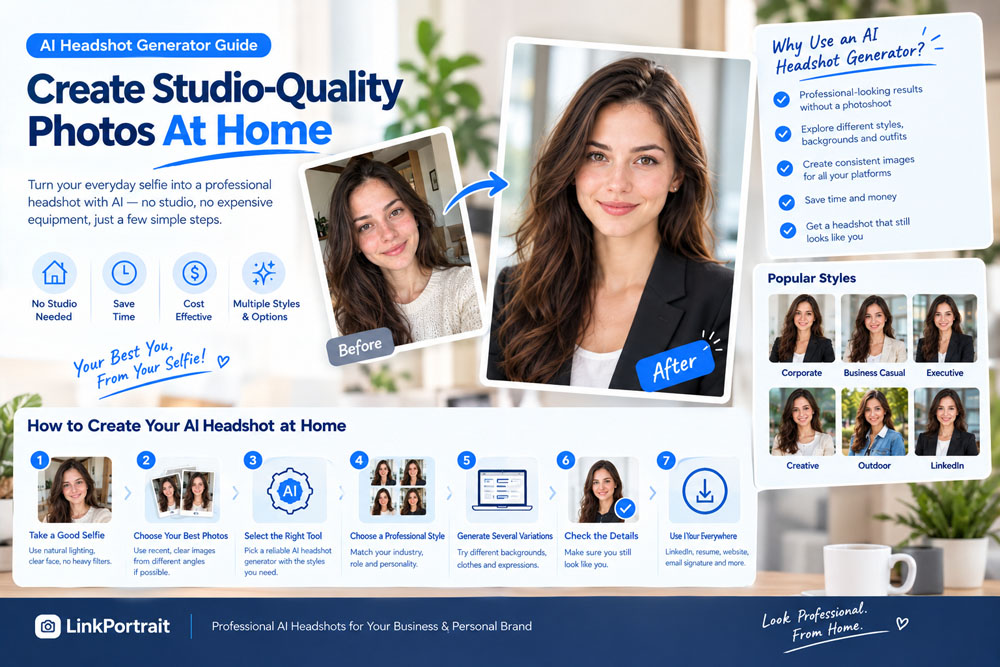
AI Professional Headshots Generator>>
You don't need an expensive camera, a professional photography studio, or a complicated photoshoot to get a great professional headshot anymore.
With an AI headshot generator, you can transform ordinary selfies into polished, studio-quality portraits from the comfort of your home. Whether you need a professional LinkedIn photo, a business headshot, a resume portrait, or a consistent image for your company website, AI tools make professional-looking photography more accessible than ever.
But getting a great result involves more than uploading a selfie and clicking a button.
The quality of your original photos, the AI headshot style you choose, the lighting, and the final image selection all influence the outcome.
In this guide, you'll learn how AI headshot generators work, how to create studio-quality photos at home, how to choose the right professional style, and how to avoid the mistakes that can make AI-generated portraits look artificial.
What Is an AI Headshot Generator?
An AI headshot generator is a tool that uses artificial intelligence to create or transform portrait photographs into professional-looking headshots.
Depending on the tool, you may upload one or more existing photos and choose a desired appearance, such as business formal, business casual, corporate, or executive.
The AI can generate portraits with different:
- Professional outfits
- Studio backgrounds
- Office environments
- Lighting conditions
- Camera angles
- Facial expressions
- Portrait compositions
For example, you might start with a casual smartphone selfie taken at home and generate a business portrait with a blazer, a neutral background, and professional studio-style lighting.
The purpose is to make creating a professional portrait easier without requiring a traditional photoshoot.
However, results vary by tool and source image. A good AI headshot should still resemble your real appearance rather than making you look like a completely different person.
Why Create Studio-Quality Headshots at Home?
Traditional professional photography can be an excellent option, but it requires scheduling, preparation, and sometimes a significant budget.
An AI headshot generator offers a convenient alternative for everyday professional profiles.
1. Save Time
You can start with photos you already have rather than arranging an appointment with a photographer.
This is particularly useful when you need to update your LinkedIn profile, submit a job application, or launch a professional website quickly.
2. Avoid Studio Equipment
You don't necessarily need a DSLR camera, lighting equipment, a backdrop, or a dedicated photography space.
A recent smartphone photo can provide a useful starting point.
3. Explore Multiple Professional Styles
You can experiment with different clothing, backgrounds, and portrait styles without physically changing outfits or locations.
4. Create Photos for Different Platforms
One professional portrait may work for LinkedIn, while another may be better suited to a company website, personal portfolio, or business directory.
AI-generated variations allow you to compare different options.
5. Make Professional Photography More Accessible
For students, freelancers, job seekers, entrepreneurs, and remote workers, AI headshots can provide a convenient way to create professional-looking portraits without organizing a traditional photoshoot.
How to Choose the Right AI Headshot Generator
Not all AI headshot tools work the same way. Before choosing one, consider the following factors.
Image Realism
Look for natural skin texture, realistic eyes, believable hair, and accurate facial proportions.
An image that looks heavily airbrushed or artificial may not be suitable for a professional profile.
Facial Consistency
The generated portrait should preserve your recognizable facial features, including your face shape, eyes, nose, hairstyle, and skin tone.
Style Options
Choose a tool that supports the type of portrait you need, such as LinkedIn headshots, business portraits, executive photos, or business-casual images.
Ease of Use
A straightforward workflow makes it easier to upload photos, select styles, generate results, and compare the finished portraits.
Pricing and Free Trials
Check how many images you can generate, whether high-resolution downloads are included, and whether you need to create an account or purchase a package.
Don't assume that a tool advertised as free provides unlimited high-resolution results.
Privacy
Your selfies contain personal information. Review the tool's privacy policy, including how uploaded photos are stored, processed, retained, and deleted.
Choose a service whose data practices meet your comfort level.
How to Create Studio-Quality AI Headshots at Home
Follow these steps to get the best possible results from your existing photos.
Step 1: Take a Good Source Photo
Your source photo is the foundation of your AI headshot.
You don't need to look like a professional model, but the AI needs a clear view of your face.
For the best starting point:
- Use a recent photograph.
- Make sure your face is in focus.
- Choose natural, even lighting.
- Keep your face unobstructed.
- Avoid heavy beauty filters.
- Use a reasonably high-resolution image.
- Make sure your current hairstyle and appearance are visible.
You can take a selfie with your smartphone or ask someone to take a photograph for you.
If possible, use a rear-facing camera or ask someone else to take the photo, as this can help you avoid some of the distortion associated with close-up selfies.
Quick tip: Stand facing a window during the day. Soft natural light is often more flattering than a bright ceiling light or harsh direct sunlight.
Step 2: Use a Simple Background
Your source photo doesn't need a professional backdrop.
A plain wall, uncluttered room, or simple indoor setting is usually sufficient.
The background matters less than having clear facial details, although a busy background can sometimes make the image harder to assess.
Avoid taking your reference photos in very dark environments or places with strong colored lighting.
The objective is to give the AI a clear reference for your actual appearance.
Step 3: Upload Your Photos
Open your chosen AI headshot generator and follow its upload instructions.
Some tools work from a single photo, while others request several images.
If multiple photos are supported, choose consistent, recent images showing your face from different angles.
For example:
- A front-facing photograph
- A slightly angled portrait
- A photo with a natural smile
- A photograph with a relaxed expression
Avoid mixing images from different stages of your life, especially if your hairstyle or facial appearance has changed significantly.
Follow the tool's specific recommendations for image quantity, resolution, and file format.
Step 4: Choose Your Professional Headshot Style
This is where you can customize the result for your intended use.
Consider the following popular styles.
Corporate Headshots
A suit or blazer, a clean studio background, and professional lighting. This style works well for corporate profiles, consultants, and many business professionals.
Business Casual Headshots
A button-down shirt, sweater, or blazer with a modern office background. This is a versatile option for technology professionals, freelancers, and startup employees.
Executive Headshots
A polished outfit, confident expression, and sophisticated background. This style can suit senior managers, business owners, and executives.
LinkedIn Headshots
A clear head-and-shoulders composition, natural expression, and uncluttered background. The focus should remain on your face.
Creative Professional Headshots
A more contemporary appearance with greater flexibility in clothing, color, and background. This may suit designers, photographers, and other creative professionals.
Choose a style that matches your industry and personality rather than automatically selecting the most formal option.
Step 5: Generate Several Variations
If the tool allows you to generate multiple images, compare several results instead of selecting the first one.
Look for differences in:
- Facial accuracy
- Lighting
- Clothing
- Background
- Expression
- Composition
Sometimes a simpler portrait will look more realistic than a heavily stylized one.
The goal is not to create the most dramatic image. It's to find the portrait that looks professional while remaining recognizable.
Step 6: Check the Facial Details
Before using your new headshot, inspect it carefully.
Pay particular attention to:
- Eyes and eyebrows
- Teeth and smile
- Hairline and hairstyle
- Skin texture
- Facial proportions
- Clothing details
- Earrings, glasses, or other accessories
AI can occasionally introduce small visual inconsistencies.
If something looks unnatural, try another variation or use a different source photograph.
Step 7: Choose the Best Final Image
Your final selection should satisfy three requirements:
- It looks professional.
- It resembles your real appearance.
- It fits the platform where you intend to use it.
You don't necessarily need the most glamorous result.
For professional use, a natural, believable portrait is often more appropriate than an image with excessive retouching or dramatic styling.
How to Make AI Headshots Look More Realistic
Even with a good AI headshot generator, a few simple decisions can significantly improve the result.
Avoid Excessive Skin Smoothing
Real skin has texture. Overly smooth skin can make a portrait look artificial.
Choose results that preserve natural facial details instead of making your face appear plastic.
Keep Your Age Consistent
Avoid selecting a portrait that makes you look dramatically younger or older than you do in real life.
Your professional headshot should represent your current appearance.
Choose Believable Clothing
Your outfit should make sense for your industry.
A software developer may prefer business casual, while a lawyer or financial consultant may choose a more formal style.
Use Appropriate Backgrounds
A neutral studio background is versatile. A modern office can provide additional professional context.
Avoid backgrounds that are visually distracting or inconsistent with the portrait's lighting.
Maintain a Natural Expression
A relaxed smile or confident neutral expression often works better than an exaggerated pose.
Keep Your Facial Features Consistent
Don't choose an image simply because it makes your jawline sharper, your eyes larger, or your face significantly thinner.
The more the image changes your appearance, the less useful it may be as a representation of you.
Best AI Headshot Styles for Different Professions
The most appropriate headshot depends on your work and how you present yourself professionally.
| Profession | Suggested style |
|---|---|
| Corporate professionals | Suit or blazer with a neutral background |
| Software developers | Modern business casual |
| Lawyers | Formal clothing with a clean studio background |
| Nurses and healthcare professionals | Approachable expression and clean professional styling |
| Executives | Polished portrait with sophisticated lighting |
| Freelancers | Professional but personable |
| Entrepreneurs | Modern business or smart-casual styling |
| Designers and creatives | Contemporary styling with individual personality |
| Students and graduates | Simple, approachable professional portrait |
| Consultants | Business attire with a natural expression |
These are starting points, not strict rules. Choose the style that fits your specific role, workplace, and intended audience.
Where Can You Use AI-Generated Headshots?
Once you've selected a suitable portrait, you can consider using it across your professional platforms.
A professional profile photo can help create a consistent professional presence.
Choose a clear image that remains recognizable at small sizes.
Resume and Career Profiles
If a photo is appropriate for your market and application, use a simple, professional portrait. Remember that resume-photo conventions differ by country and employer.
Company Websites
A consistent portrait style can help employee biographies look more cohesive.
Personal Websites
Consultants, freelancers, and entrepreneurs can use professional headshots to support their personal branding.
Email Signatures
A small, clear portrait can help maintain a recognizable professional identity.
Professional Directories
AI headshots can provide updated portrait options for industry associations, speaker biographies, and other professional listings, provided the image meets the relevant organization's requirements.
For high-stakes branding, editorial work, or situations requiring a genuine photographic record, traditional photography may still be the better choice.
AI Headshots vs. Traditional Studio Photography
Both approaches have advantages.
| Feature | AI headshot generator | Traditional photography |
|---|---|---|
| Convenience | Can be done at home | Requires a scheduled session |
| Equipment | Existing photos may be sufficient | Photographer supplies or arranges equipment |
| Style variations | Often easy to generate | May require additional poses or outfit changes |
| Personal direction | Depends on the tool and workflow | Photographer can provide live guidance |
| Image authenticity | Generated or transformed image | Photograph captured during the session |
| Best use | Everyday professional profiles | Specialized shoots and high-stakes branding |
AI headshots are convenient, but they aren't automatically better than traditional photography.
The right choice depends on your budget, intended use, desired level of control, and preference for generated versus camera-captured images.
Common Mistakes to Avoid
Before finalizing your AI headshot, watch out for these common problems.
Using blurry source photos: Poor facial detail can limit the quality of the result.
Uploading outdated images: Your final portrait may not accurately represent your current appearance.
Choosing an unrealistic face: An attractive image is not necessarily a good professional headshot if it no longer looks like you.
Overusing beauty effects: Excessive retouching can make your portrait look artificial.
Ignoring clothing details: Distorted collars, buttons, jewelry, or glasses can reduce the image's quality.
Using a distracting background: The background should support your professional presentation, not dominate the image.
Selecting the first result: Comparing several variations can help you find a more natural portrait.
Ignoring privacy: Before uploading personal photographs, understand how the service handles your images.
Create Professional AI Headshots With LinkPortrait
If you want to create a professional headshot without organizing a traditional photoshoot, LinkPortrait offers a convenient starting point.
You can use your existing photos to explore professional portrait styles for LinkedIn, business profiles, and other online uses.
For the best results:
- Start with recent, clear photos.
- Choose a professional style that fits your industry.
- Compare the generated variations.
- Check that your facial features remain recognizable.
- Select a realistic image for your intended platform.
You can visit LinkPortrait to explore its AI photo-generation options.
The objective is simple: create a polished professional portrait while keeping your real appearance at the center.
Frequently Asked Questions
Can I create a professional headshot at home without a professional camera?
Yes. A clear smartphone photo can provide a useful starting point for an AI headshot generator. Good lighting, sharp facial details, and a recent reference image are more important than owning expensive camera equipment.
How many photos do I need for an AI headshot generator?
It depends on the tool. Some generators accept a single image, while others request multiple photos. Follow the service's upload requirements and prioritize clear, recent, consistent images.
Are AI headshots suitable for LinkedIn?
AI-generated headshots can be suitable for LinkedIn when they look professional and accurately represent your appearance. Check the final image carefully and follow any applicable platform or employer requirements.
Can AI turn a casual selfie into a corporate headshot?
Yes. Depending on the generator, you may be able to create a portrait with business clothing, professional lighting, and a neutral studio or office background from a casual source photo.
Will my AI headshot look exactly like me?
Not necessarily. Results vary according to the tool, source images, and selected style. Review facial features carefully and try alternative generations if the result looks noticeably different from your real appearance.
Are free AI headshot generators worth trying?
Free options can be useful for testing image quality and exploring styles. Before using one, check its generation limits, image resolution, account requirements, and privacy practices.
Is an AI headshot better than a real photo?
Not in every situation. AI headshots can be convenient for everyday business profiles, while traditional photography offers a genuine camera-captured image and direct photographer guidance. Choose according to your needs.
Final Thoughts: Create Your Professional Headshot Without Leaving Home
Creating a studio-quality-looking headshot at home is now more accessible than ever.
With a good source selfie and an appropriate AI headshot generator, you can explore professional clothing, clean backgrounds, and polished portrait styles without arranging a traditional photoshoot.
The secret is to focus on the details that matter:
- Start with a clear, recent photo.
- Use natural lighting.
- Choose a style appropriate for your profession.
- Keep your facial features recognizable.
- Avoid excessive retouching.
- Inspect the final image before using it.
Remember, a great professional headshot doesn't need to make you look like a different person.
It should make you look like yourself at your professional best.
If you're ready to refresh your LinkedIn profile, update your business portrait, or create a new professional image for your website, an AI headshot generator can be a convenient place to start.