AI Headshots for Business Profiles: Everything You Need to Know
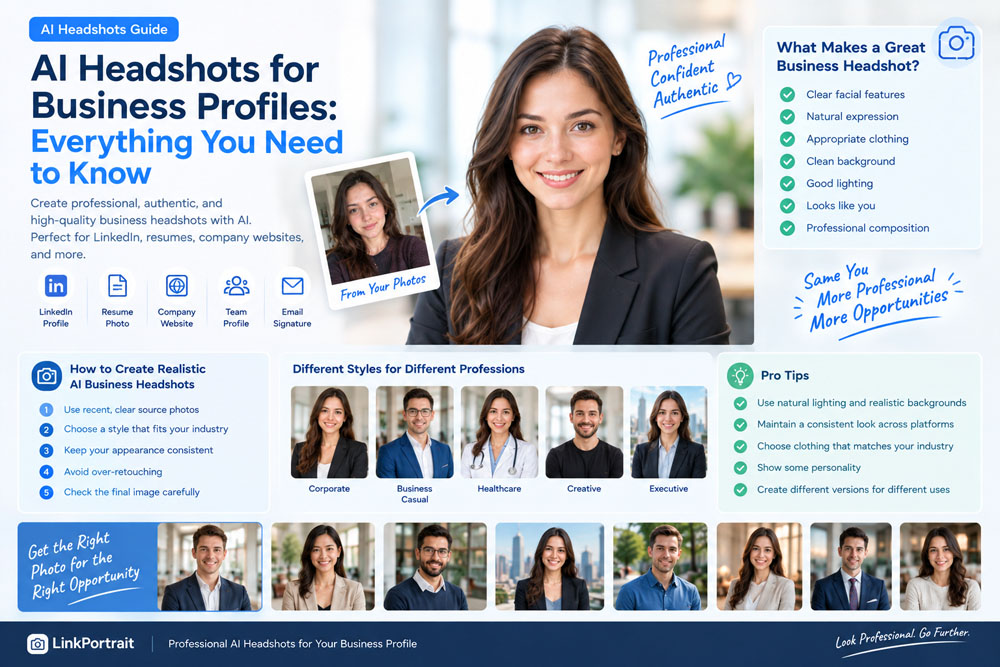
Your business profile photo is often one of the first things people notice about you online.
Whether you're a founder, consultant, freelancer, sales professional, recruiter, executive, or job seeker, your profile picture can influence how people perceive your professional presence.
The problem is that getting a high-quality business headshot traditionally requires a photographer, studio, professional lighting, and several hours of preparation.
Today, AI headshots for business profiles offer another option.
With AI photography tools, you can create professional-looking business portraits from your existing photos without arranging a traditional photoshoot.
But are AI headshots suitable for professional use? What makes a good business headshot? How should you choose your photos and styles?
This guide explains everything you need to know about using AI headshots for business profiles.
What Are AI Headshots for Business Profiles?
AI headshots are professionally styled portraits generated or enhanced using artificial intelligence.
Instead of hiring a photographer, you typically provide several photos of yourself and select the type of professional appearance you want.
An AI headshot generator can then create portraits with different:
- Backgrounds
- Clothing
- Lighting
- Camera angles
- Expressions
- Professional settings
- Portrait compositions
For example, you might start with a few casual smartphone photos and create business-oriented portraits suitable for:
- Company websites
- Business profiles
- Professional directories
- Speaker profiles
- Resume profiles
- Personal websites
- Email signatures
- Social media profiles
The goal isn't necessarily to create a completely new appearance.
A good AI headshot should create a professional representation of your existing appearance.
Why Are Business Headshots Important?
A business profile photo can serve as your visual introduction before someone ever speaks with you.
People may see your photo when they:
- Visit your LinkedIn profile
- Read your company bio
- Receive your email
- Visit your personal website
- Search for your name
- View your professional portfolio
- Read an article you published
- Attend an event where you're a speaker
A professional-looking photo can make your online presence feel more complete and consistent.
For professionals who frequently work online, this can be particularly useful.
AI Headshots vs. Traditional Professional Photography
AI headshots and traditional photography serve slightly different purposes.
Traditional Photography
A professional photographer provides:
- Real camera equipment
- Professional lighting
- Live posing direction
- Real environments
- Professional retouching
- A physical photoshoot experience
AI Headshots
AI can provide:
- Faster image generation
- Multiple styles
- Different backgrounds
- Different outfits
- Multiple variations
- No physical studio required
- Convenient remote creation
Neither approach has to replace the other.
For an executive portrait, company campaign, magazine feature, or brand photoshoot, traditional photography may still be appropriate.
For everyday online business profiles, AI can provide a convenient way to create additional professional portrait options.
What Makes a Good Business Headshot?
A professional business headshot doesn't need to look overly formal.
The most important qualities are usually:
1. Clear Facial Features
Your face should be easy to see.
2. Natural Expression
A relaxed smile or confident neutral expression can work well.
3. Appropriate Clothing
Your clothing should match your industry and professional role.
4. Clean Background
The background shouldn't distract from your face.
5. Good Lighting
Your face should be evenly and naturally illuminated.
6. Realistic Appearance
The final image should still look like you.
7. Professional Composition
Your head and shoulders should be positioned naturally within the frame.
A technically perfect image isn't useful if it no longer resembles the person in the profile.
1. Choose the Right Source Photos
The quality of your AI business headshots starts with your original photos.
Choose recent images that clearly show your face.
Good source photos generally have:
- Good resolution
- Clear facial details
- Natural lighting
- Minimal filters
- No face obstruction
- Current hairstyle
- Current facial hair
- A recognizable appearance
You don't necessarily need professional photographs.
A good smartphone camera can provide useful source material.
2. Use Multiple Photos When Possible
One image may not provide enough information about your appearance.
Different photographs can show:
- Front-facing features
- Facial angles
- Smile
- Hair
- Jawline
- Skin tone
- Overall appearance
Using several consistent photos can help produce a more recognizable result.
Try to avoid mixing photos taken many years apart.
If your appearance has changed significantly, prioritize your most recent images.
3. Choose a Business Style That Matches Your Industry
Not every professional needs the same type of headshot.
A lawyer may want a different visual style from a software developer.
A startup founder may prefer something different from a corporate executive.
For example:
Corporate Professional
- Suit or blazer
- Neutral background
- Clean studio lighting
- Formal composition
Business Casual
- Button-down shirt
- Sweater
- Blazer
- Modern office environment
Startup Founder
- Modern workspace
- Smart-casual clothing
- Natural lighting
- More relaxed expression
Creative Professional
- More personality
- Contemporary background
- Less formal styling
Healthcare Professional
- Clean professional clothing
- Bright environment
- Approachable expression
- Simple background
The best style depends on where and how you use the image.
4. Keep Your Headshot Consistent With Your Profession
One of the biggest advantages of AI headshots is the ability to experiment with different styles.
But more options aren't always better.
Your business profile photo should make sense for your professional identity.
For example, if you are applying for a corporate position, an extremely casual beach portrait may not communicate the intended professional image.
Similarly, a creative freelancer may not need an extremely formal corporate portrait.
Think about the question:
"What would someone expect my professional profile to look like?"
Then choose a visual style that supports that expectation.
5. Choose the Right Background
The background can dramatically change the impression of a business headshot.
Plain Studio Background
Simple and professional.
Useful for:
- Resume profiles
- Corporate directories
Office Background
Creates a workplace context.
Useful for:
- Founders
- Consultants
- Managers
- Corporate professionals
Soft Neutral Background
Modern and versatile.
Useful for:
- Personal websites
- Professional portfolios
Industry-Specific Environment
Can add context when appropriate.
For example, a healthcare professional may use a clean clinical environment, while a designer may use a modern creative workspace.
The background should support the portrait rather than compete with it.
6. Think About Clothing Carefully
Clothing is an important part of professional presentation.
Consider what people in your industry normally wear.
Formal Industries
Examples include:
- Law
- Finance
- Consulting
- Banking
A suit or blazer may be appropriate.
Technology
Business casual may be more natural.
For example:
- Button-down shirt
- Sweater
- Polo
- Blazer
Creative Industries
You may have more flexibility with:
- Colors
- Textures
- Casual styling
- Contemporary clothing
The important thing is consistency with your professional identity.
7. Don't Over-Retouch Your Face
AI can make portraits extremely polished.
But excessive retouching can create a problem.
Avoid making yourself look dramatically different through:
- Excessive skin smoothing
- Major face reshaping
- Unrealistic teeth whitening
- Dramatic eye changes
- Extreme jawline changes
- Significant age reduction
A professional headshot should look polished while remaining recognizable.
Think:
Professional, not artificial.
8. Use Natural Expressions
Your expression affects how approachable your business profile feels.
Depending on your profession, you might choose:
Friendly Smile
Useful for consultants, recruiters, sales professionals, and client-facing roles.
Confident Smile
Works well for executives and entrepreneurs.
Relaxed Expression
Useful for modern professional profiles.
Neutral Expression
Can work for more formal corporate applications.
You don't need to use the exact same expression in every image.
Creating several variations allows you to select the one that feels most natural.
9. Create Different Versions for Different Platforms
One useful advantage of AI headshots is that you don't necessarily have to use exactly the same image everywhere.
You could create:
Professional head-and-shoulders portrait.
Company Website
More branded or environmental portrait.
Resume
Simple and conservative portrait.
Personal Website
Slightly more relaxed professional image.
Speaker Profile
More polished editorial-style portrait.
Email Signature
Simple close-up portrait.
The underlying appearance should remain consistent while the visual style can adapt to the context.
10. LinkedIn Is One of the Most Common Uses
LinkedIn is particularly suitable for professional headshots.
Your profile photo appears alongside:
- Your name
- Job title
- Professional history
- Posts
- Comments
- Networking activity
A consistent professional image can therefore become part of your personal brand.
For LinkedIn, a useful AI headshot style usually includes:
- Clear face
- Professional clothing
- Clean background
- Natural lighting
- Appropriate framing
- Recognizable appearance
Avoid turning the image into a heavily stylized fashion portrait.
Your LinkedIn photo should still look like a professional profile picture.
11. AI Headshots Can Help When You Don't Have Professional Photos
Many people simply don't have a recent professional portrait.
Maybe your current profile picture is:
- A vacation photo
- An old graduation photo
- A cropped group picture
- A low-resolution selfie
- A casual social media image
Hiring a photographer may not always be convenient.
AI headshots can provide a way to create new professional options from existing photos.
This can be particularly useful when you need a professional photo quickly.
12. AI Headshots Can Be Useful for Remote Professionals
Remote workers often interact with colleagues and clients through digital platforms.
Your professional image may appear on:
- Slack
- Microsoft Teams
- Zoom
- Company directories
- Professional communities
A consistent profile photo can help maintain a recognizable professional identity across these platforms.
For remote professionals, this can be more important than having a physical office portrait.
13. What About AI Headshots for Teams?
AI headshots aren't only for individuals.
Companies may also need professional portraits for:
- Employees
- Sales teams
- Customer support
- Leadership teams
- Company websites
- Speaker profiles
One challenge with team photography is consistency.
A group of employees may have photographs taken at different times, with different cameras, backgrounds, and lighting.
AI can potentially help create more visually consistent portraits.
However, companies should establish clear guidelines regarding employee consent, image usage, privacy, and how generated portraits are used.
14. Don't Make Everyone Look Identical
Consistency doesn't mean every employee should have exactly the same face style.
For company teams, consistency should usually focus on things such as:
- Background style
- Lighting
- Image dimensions
- Overall composition
- Professional level
Employees should still look like themselves.
The objective is:
consistent branding + individual identity.
15. Check Your AI Headshot Before Using It
Never upload an AI-generated portrait without reviewing it carefully.
Look for:
Face
Does it still look like you?
Eyes
Are the eyes natural and symmetrical?
Teeth
Does your smile look realistic?
Hair
Does your hairstyle make sense?
Clothing
Do collars, buttons, and accessories look correct?
Hands
If hands are visible, check their appearance carefully.
Background
Does the environment look realistic?
Lighting
Does the lighting make sense?
A few seconds of inspection can help prevent obvious AI artifacts from appearing on your professional profile.
Are AI Headshots Good Enough for Professional Use?
For many everyday business-profile situations, AI-generated headshots can be a practical option.
They can be particularly useful for:
- LinkedIn profiles
- Personal websites
- Resume profiles
- Professional directories
- Business social media
- Email signatures
- Team profiles
However, professional use doesn't mean every situation is identical.
For high-stakes branding campaigns, advertising campaigns, executive publications, press photography, or situations where a real photographic record is important, you may still want professional photography.
The right choice depends on the purpose of the image.
How to Create Professional AI Headshots With LinkPortrait
If you need a new business profile photo but don't want to organize a traditional photoshoot, LinkPortrait can be used to create professional AI portraits from your existing photos.
Start with several recent, clear photos of yourself.
Then choose a style that matches your professional purpose, such as:
- LinkedIn Headshots
- Business Headshots
- Executive Headshots
- Business Casual
- Corporate Portraits
- Professional Profile Photos
After generating several variations, select the images that look both professional and recognizable.
The most useful result isn't necessarily the most heavily edited one.
It's the one that looks like you at your professional best.
AI Headshots for Different Professional Roles
Different careers may benefit from different visual approaches.
Lawyers
Professional, formal, confident.
Nurses and Healthcare Professionals
Clean, approachable, trustworthy.
Executives
Polished, confident, corporate.
Recruiters
Friendly, professional, approachable.
Consultants
Professional but personable.
Real Estate Agents
Approachable, polished, client-friendly.
Entrepreneurs
Confident and modern.
Developers and Tech Professionals
Clean, contemporary, often business casual.
Designers and Creatives
Professional with more individual personality.
The best business headshot is the one that fits both your profession and your personality.
Business Headshots Should Look Professional—Not Perfect
There's a common misconception that a professional headshot needs to look flawless.
It doesn't.
A strong business profile photo should communicate:
Professionalism + Authenticity + Personality
If the image is technically perfect but doesn't resemble you, it may not be useful.
If it looks exactly like you but has poor lighting and distracting composition, it may also not make the strongest impression.
The sweet spot is a portrait that combines both.
Final Thoughts
AI headshots have made professional photography more accessible for people who need better business profile pictures without organizing a traditional photoshoot.
Whether you're updating your LinkedIn profile, launching a personal website, applying for jobs, building a professional brand, or creating a company profile, AI can provide a convenient way to create new portrait options.
The most important principles are simple:
- Use recent source photos
- Keep your appearance recognizable
- Choose a style that fits your profession
- Use realistic clothing
- Choose a clean background
- Keep expressions natural
- Avoid excessive retouching
- Check the final image carefully
- Create different versions for different professional platforms
Ultimately, the best AI headshot isn't the one that makes you look like someone else.
It's the one that makes you look like yourself—professional, confident, and ready for business.