How to Create a Dating Profile Photo That Looks Like You?
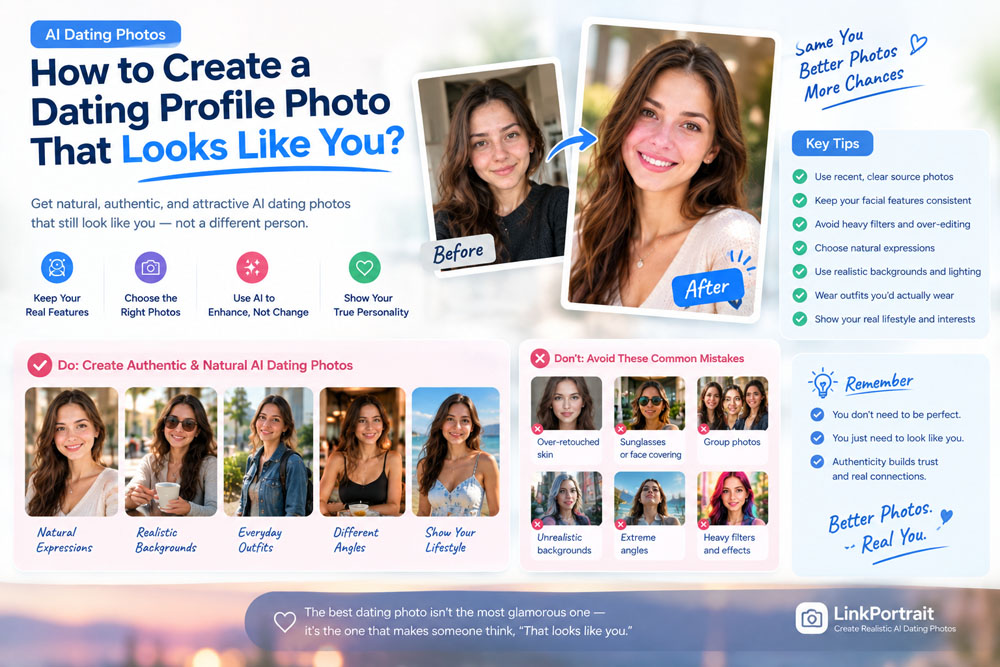
Creating a great dating profile photo is about more than looking attractive.
It needs to look like you.
This becomes especially important when using AI dating photos. AI can create professional lighting, better backgrounds, stylish outfits, and polished compositions, but there is a fine line between improving your photo and changing your appearance.
If your AI-generated dating profile picture looks too different from you, it may create the wrong expectations when you meet someone in person.
The goal should be simple:
Create a better version of your real appearance—not a completely different person.
In this guide, we'll explain how to create dating profile photos that look natural, recognizable, and attractive while using AI.
Why Does It Matter If Your Dating Photo Looks Like You?
Your dating profile photo is usually the first visual impression someone gets.
A great photo can help communicate:
- Your personality
- Your style
- Your confidence
- Your lifestyle
- Your appearance
But accuracy matters too.
Imagine someone sees your profile and likes your photos, but when you meet in person, you look noticeably different.
The problem isn't necessarily that your real appearance is less attractive.
The problem is expectation mismatch.
Your dating photos should give someone a realistic idea of what you'll look like when you meet.
That's why realistic AI dating photos are more useful than heavily altered images.
What Makes a Dating Profile Photo Look Like You?
Several elements determine whether an AI-generated image actually resembles you.
Facial Structure
Your:
- Face shape
- Jawline
- Cheekbones
- Nose
- Eyes
- Lips
should remain consistent.
Hair
Your hairstyle and hairline should be reasonably similar to your current appearance.
Skin Tone
AI shouldn't dramatically change your natural skin tone.
Age
Avoid generating photos that make you look significantly younger or older than you actually are.
Facial Hair
If you normally have a beard or mustache, your photos should generally reflect that.
Body Proportions
AI should not dramatically change your body shape.
When these elements remain consistent, an AI dating photo is much more likely to feel authentic.
1. Start With Recent Photos
The first step is surprisingly simple:
Use recent photos.
Don't build an AI dating profile using pictures from five or ten years ago just because you looked great in them.
Your source photos should represent your current appearance.
Ideally, choose photos showing:
- Your current hairstyle
- Your current facial hair
- Your current glasses
- Your current face shape
- Your current overall appearance
If you've recently changed your appearance, prioritize newer photos.
The AI needs accurate information about what you look like now.
2. Use Multiple Source Photos
One photograph doesn't always provide enough information.
A single photo may only show:
- One angle
- One expression
- One lighting condition
- One hairstyle position
Using multiple photos can give an AI system more information about your facial features.
A useful collection might include:
- Front-facing photo
- Slightly angled photo
- Smiling photo
- Neutral-expression photo
- Indoor photo
- Outdoor photo
You don't necessarily need dozens of images.
A small collection of clear, recent, consistent photos can be more useful than a large collection of poor-quality images.
For more information, see:
How Many Photos Do You Need for AI Headshots?
3. Avoid Heavy Filters
Beauty filters can be a problem when creating AI dating photos.
Filters may change:
- Skin texture
- Face shape
- Eye size
- Nose shape
- Jawline
- Skin tone
If the AI learns from an already heavily edited photograph, it may interpret the edited appearance as your real appearance.
That's one reason your source photos should be as natural as possible.
Avoid using:
- Face-slimming filters
- Eye-enlarging filters
- Extreme skin smoothing
- Snapchat-style facial effects
- Dramatic beauty filters
A simple, unfiltered smartphone photo can often be a better starting point.
4. Make Sure Your Face Is Clearly Visible
Your source photos should provide clear information about your face.
Avoid relying heavily on images where you're wearing:
- Sunglasses
- Masks
- Large hats
- Scarves covering your face
- Your hand over your face
You can still include lifestyle photos with sunglasses in the final dating profile.
But your primary reference photos should make your facial features easy to see.
5. Don't Change Your Face Too Much
One of the biggest mistakes with AI dating photos is asking the AI to dramatically change your appearance.
For example:
"Make me look 10 years younger, slimmer, taller, with a sharper jawline and perfect skin."
You might get an attractive image.
But you may also get a person who doesn't look like you anymore.
Instead, think about AI as a professional photography assistant.
Ask it to improve:
- Lighting
- Background
- Clothing
- Composition
- Camera angle
- Overall image quality
while keeping your facial identity consistent.
6. Choose Natural Expressions
A dating profile shouldn't look like a passport application.
At the same time, exaggerated expressions can make AI photos feel artificial.
Try a variety of natural expressions.
Subtle Smile
A small, relaxed smile can look friendly and approachable.
Natural Smile
Useful for your primary dating profile photo.
Relaxed Expression
Works well for lifestyle photos.
Laughing
Can create a more candid feeling when used in the right environment.
You don't need every image to have the same expression.
In fact, some variation can make your profile feel more realistic.
7. Keep Your Hairstyle Consistent
Hair is one of the easiest ways for people to recognize you.
If your AI dating profile contains:
- Short hair in one photo
- Long hair in another
- Different hair color in another
- Completely different hairline in another
the profile can feel inconsistent.
Some variation is normal because hairstyles can look different depending on lighting and styling.
But major changes can make the photos appear to represent different people.
If you're creating a set of AI dating photos, keep your core hairstyle consistent.
8. Don't Make Yourself Look Too Perfect
This may sound strange, but perfection can reduce realism.
Real people have:
- Skin texture
- Small facial asymmetries
- Fine lines
- Individual features
- Slightly imperfect hair
- Natural expressions
If AI removes all of these details, the result can look artificial.
Instead of asking for flawless skin, aim for:
healthy + natural + realistic
A good AI dating photo should look like a great photograph of you—not a digitally manufactured version of you.
9. Choose Realistic Clothing
Your clothes are another important part of authenticity.
If you normally wear casual clothing, your dating profile shouldn't suddenly show you wearing expensive designer suits in every photo.
Likewise, if you're naturally fashion-conscious, you can show more polished outfits.
Try creating a realistic mix:
Casual
T-shirt, jeans, sneakers, or everyday clothing.
Smart Casual
Button-down shirt, sweater, jacket, or similar styling.
Date Night
A slightly more polished outfit.
Outdoor
Clothing appropriate for the actual activity.
The goal is to show what someone could realistically expect you to wear.
10. Create Different Photos, Not Different Versions of Yourself
This is a useful distinction.
AI should help you create:
Different situations
rather than:
Different identities.
For example, you could create:
- Coffee shop photo
- Outdoor photo
- Travel photo
- Casual portrait
- Dinner photo
- Hobby photo
while keeping your:
- Face
- Hair
- Age
- Body proportions
- Overall appearance
consistent.
This gives your dating profile variety without creating confusion.
11. Use Realistic Dating Photo Locations
AI can generate almost any background.
But that doesn't mean every background belongs on your dating profile.
A realistic dating profile might include:
Coffee Shop
Relaxed and casual.
Park
Natural and approachable.
City Street
Modern and energetic.
Restaurant
Good for a date-night image.
Beach
Useful if you genuinely enjoy beach or vacation activities.
Hiking Trail
Appropriate if hiking is actually part of your lifestyle.
The best background is one that feels like somewhere you might realistically be.
12. Match the Lighting to the Environment
Lighting has a huge impact on realism.
If your background shows a sunset but your face has bright midday lighting, the image can look artificial.
Try to make the lighting consistent.
For example:
Outdoor daytime: soft natural daylight.
Golden hour: warm, directional sunlight.
Coffee shop: soft indoor lighting.
Restaurant: warmer ambient lighting.
Nighttime: realistic low-light illumination.
When the lighting makes sense, the AI dating photo becomes much more believable.
13. Include Full-Body Photos
A dating profile shouldn't necessarily consist entirely of close-up portraits.
If every image only shows your face and shoulders, someone may have limited information about your overall appearance.
Consider including at least one realistic full-body photo.
This doesn't mean you need a professional fashion photograph.
A simple lifestyle image can work.
For example:
- Walking through a city
- Standing outdoors
- Traveling
- At a casual event
- Doing a hobby
Again, the objective is realistic representation, not perfection.
14. Use Lifestyle Photos to Show Your Personality
Your dating profile isn't just about appearance.
It's also about personality.
If you enjoy:
- Coffee
- Cooking
- Hiking
- Travel
- Music
- Sports
- Art
- Reading
- Dogs
- Fitness
your photos can communicate those interests.
AI can help create visually interesting versions of these scenarios, but they should reflect your real interests.
Don't create a fake lifestyle simply because it looks impressive.
Someone who loves hiking should have hiking photos.
Someone who prefers coffee shops doesn't need to pretend to be a professional surfer.
15. Compare Your AI Photo With a Real Photo
Before uploading an AI-generated photo, compare it with a recent real photograph.
Put the two images next to each other and check:
Face
Does the face shape look similar?
Eyes
Are the eyes still recognizable?
Nose
Does the nose have the same general shape?
Jaw
Does the jawline look consistent?
Hair
Is the hairstyle believable?
Age
Do you look approximately the same age?
Skin Tone
Does the skin tone remain consistent?
Body
Are your proportions reasonably accurate?
If the answer is yes across the board, you probably have a more authentic AI dating photo.
The "Friend Test"
There's another simple test.
Show the AI-generated photo to someone who knows you well.
Don't tell them which photo is AI-generated.
Ask:
"Does this look like me?"
If they immediately recognize you, that's a positive sign.
If they hesitate or say:
"You look different."
pay attention.
Your friends may notice inconsistencies that you overlook because you're used to looking at your own face.
What Makes an AI Dating Photo Look Fake?
Here are some common warning signs.
❌ Too Much Skin Smoothing
Your face looks plastic.
❌ Unrealistic Eyes
The eyes look unusually sharp or artificial.
❌ Strange Teeth
The smile contains unnatural teeth or inconsistent details.
❌ Different Facial Structure
Your jaw, nose, or face shape changes dramatically.
❌ Unrealistic Hands
Hands and fingers can sometimes reveal AI-generated imagery.
❌ Impossible Clothing
Collars, buttons, jewelry, or accessories may look strange.
❌ Unrealistic Background
The environment looks like a fantasy scene rather than a real place.
❌ Completely Different Body
Your proportions don't match reality.
If you notice any of these issues, choose another generation.
Should You Tell Your Match That Your Photo Was AI-Generated?
There's no single rule for every dating situation, but authenticity should remain the priority.
An AI-generated dating photo shouldn't intentionally misrepresent:
- Your appearance
- Your age
- Your body
- Your lifestyle
- Your occupation
- Your location
- Your experiences
If AI has simply helped create a better portrait of your real appearance, the image is fundamentally different from using AI to create a fictional identity.
A useful principle is:
AI can improve the presentation. It shouldn't change the facts.
AI Dating Photos vs. Real Photos
You don't necessarily have to choose one or the other.
A strong dating profile can combine different types of images.
For example:
Photo 1: AI-enhanced professional portrait
Photo 2: Real casual photo
Photo 3: Lifestyle photo
Photo 4: Hobby or activity
Photo 5: Travel or outdoor photo
This can create a more balanced profile.
AI can help you fill gaps in your photo collection, while real photos can provide additional authenticity and context.
How Many AI Dating Photos Should You Create?
You don't need dozens of AI-generated images.
Creating too many can actually make your profile repetitive.
Instead, focus on a small collection with different purposes.
For example:
- Primary portrait
- Casual lifestyle
- Outdoor
- Full-body
- Hobby
- Date-night
You can then select the strongest images for your dating profile.
Quality and variety matter more than simply generating a large number of photos.
How to Create Dating Photos That Actually Look Like You
If you're using an AI dating photo generator, follow this simple process:
Step 1: Collect Recent Photos
Choose several clear photos that accurately represent your current appearance.
Step 2: Remove Poor References
Avoid blurry, heavily filtered, old, or obstructed images.
Step 3: Generate Natural Styles
Start with realistic environments and everyday clothing.
Step 4: Check Your Face
Make sure your facial identity remains consistent.
Step 5: Add Lifestyle Variety
Create different situations that reflect your actual personality.
Step 6: Review the Details
Check your hair, eyes, teeth, hands, clothing, and background.
Step 7: Compare With a Real Photo
Make sure the AI version still looks like you.
Step 8: Ask a Friend
Use the friend test if you're unsure.
Step 9: Select the Most Authentic Images
Don't automatically choose the most glamorous image.
Choose the images that best represent you.
Create More Natural Dating Profile Photos With LinkPortrait
If you don't have enough recent dating photos, LinkPortrait can help you create professional-looking AI portraits from your own photos.
Instead of completely changing your appearance, the goal is to create images that preserve your recognizable features while improving elements such as:
- Lighting
- Background
- Composition
- Clothing
- Photo quality
- Overall presentation
This can be particularly useful if you want to refresh your dating profile without organizing a professional photoshoot.
Start with clear, recent photos and select the AI-generated results that look most like your real appearance.
Final Thoughts
A great dating profile photo doesn't have to be perfect.
It needs to be believable.
When someone looks at your profile, they should get a realistic impression of what you look like and what your personality might be like.
That's why the best AI dating photos aren't necessarily the most glamorous ones.
They're the ones that make people think:
"That looks like a great photo of you."
rather than:
"That doesn't look like you."
Use AI to improve your lighting, backgrounds, clothing, composition, and photo variety.
But keep your identity, appearance, and personality consistent.
The goal isn't to create a new you.
It's to create better photos of the real you.