How To Create A Professional Headshot From A Selfie
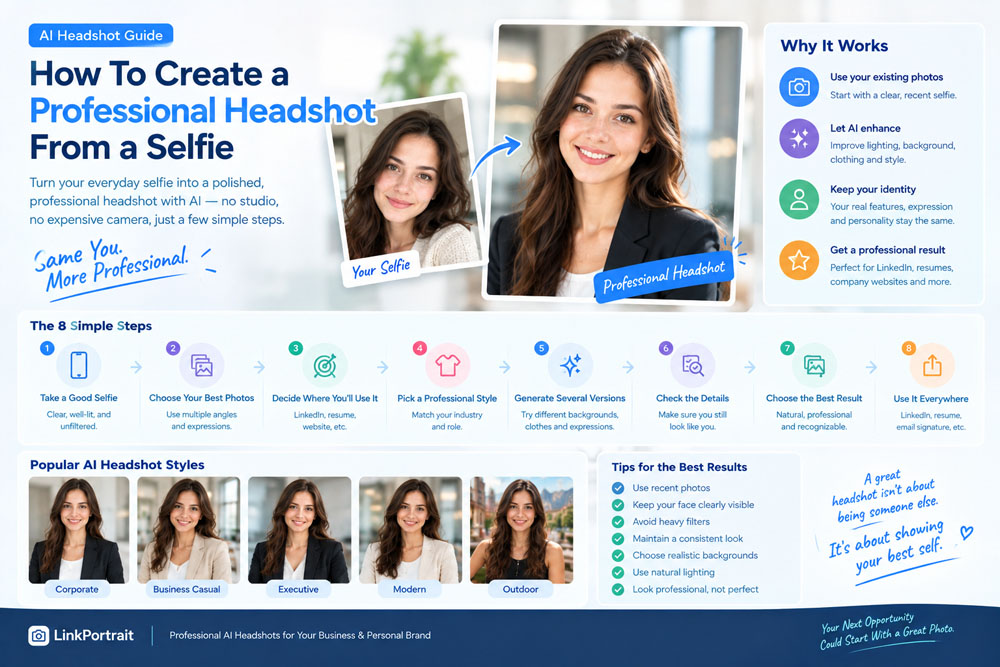
You don't always need a professional photographer to get a professional-looking headshot.
With a good smartphone selfie, the right lighting, and today's AI photo tools, you can turn an ordinary photo into a polished professional portrait for LinkedIn, your resume, company website, business profile, or personal brand.
The key, however, isn't simply making your selfie look "better."
A good professional headshot should still look like you.
It should improve the presentation of your photo while keeping your facial features, age, hairstyle, and overall appearance recognizable.
In this guide, we'll walk through how to create a professional headshot from a selfie, including how to take the right source photo, choose the right style, use AI effectively, and avoid common mistakes.
Can You Really Create a Professional Headshot From a Selfie?
Yes.
A modern smartphone can capture enough detail to create a useful starting image for an AI-generated professional headshot.
You don't necessarily need:
- A DSLR camera
- A professional studio
- Expensive lighting
- A professional photographer
- A complicated photoshoot
What matters most is the quality of your source selfie.
A clear, well-lit selfie gives an AI headshot generator much more useful information about your face than a blurry, heavily filtered, or poorly exposed image.
The process is essentially:
Selfie → AI transformation → Professional headshot
The better your starting photo, the easier it is to produce a realistic result.
1. Start With a Clear Selfie
The first step is choosing the right selfie.
Your face should be clearly visible, with enough detail for the AI to understand your facial features.
A good source selfie should ideally have:
- Clear facial details
- Good resolution
- Natural lighting
- A relatively simple background
- Your current hairstyle
- Your current facial hair
- Minimal filters
- Your face unobstructed
You don't need to smile perfectly.
You don't even need to be wearing professional clothing.
The selfie is simply the reference.
The AI can change the environment and clothing later.
2. Use Natural Lighting
Lighting is one of the most important factors when taking your source selfie.
If possible, take your selfie near a window or outdoors in soft daylight.
Avoid extremely harsh direct sunlight because it can create strong shadows across your face.
Also avoid very dark rooms.
A simple setup can work surprisingly well:
Stand facing a window → keep the camera around eye level → take a clear photo.
This provides the AI with useful information about:
- Skin tone
- Face shape
- Eyes
- Nose
- Jawline
- Hair
- Facial features
Good lighting isn't just about making the selfie look attractive.
It helps the AI understand what you actually look like.
3. Keep the Camera at Eye Level
Camera angle can dramatically affect facial proportions.
If you hold the phone too low, your face may look different.
If you hold it too high, your facial proportions can also change.
For a professional headshot reference, try keeping the camera approximately at eye level.
Your face should be relatively centered in the frame.
You don't need an extreme close-up.
Leave enough space around your head and shoulders so the AI can understand your overall proportions.
4. Don't Use Heavy Beauty Filters
One of the biggest mistakes is starting with an already heavily edited selfie.
Beauty filters can change:
- Face shape
- Skin texture
- Eye size
- Nose shape
- Jawline
- Skin tone
The AI may interpret those changes as part of your actual appearance.
Instead, use a relatively natural selfie.
Small imperfections are completely fine.
In fact, natural facial details can help produce a more recognizable result.
5. Take More Than One Selfie
You don't necessarily need just one source image.
If you're able to provide multiple photos, consider taking several selfies with slightly different angles and expressions.
For example:
- Front-facing
- Slightly turned left
- Slightly turned right
- Natural smile
- Relaxed expression
This can provide a more complete representation of your appearance.
The goal isn't to submit hundreds of images.
A small collection of clear, recent, consistent photos can be much more useful.
6. Choose the Professional Style You Actually Need
"Professional headshot" can mean many different things.
Before generating your image, think about where you'll use it.
LinkedIn Headshot
Usually works well with:
- Clean background
- Business or business-casual clothing
- Natural expression
- Head-and-shoulders framing
Resume Photo
A more conservative and simple style may be appropriate.
Company Website
You may want an office environment or a consistent corporate background.
Executive Profile
A more polished business style may work well.
Personal Website
You have more flexibility and can include personality.
Professional Social Media
A modern business-casual look can be appropriate.
The best AI prompt depends on the intended use.
7. Choose Appropriate Clothing
One of the biggest advantages of AI headshot generation is that you don't have to take your selfie wearing a suit.
You can start with an ordinary shirt and generate a professional outfit.
Possible styles include:
- Suit
- Blazer
- Button-down shirt
- Sweater
- Polo shirt
- Business-casual outfit
- Professional dress
- Smart-casual clothing
But choose clothing that makes sense for your industry.
A lawyer, software developer, designer, nurse, executive, and startup founder may all have different expectations for professional attire.
The goal is to look professional for your role, not simply formal.
8. Use a Clean Background
The background should support the professional appearance of the image.
Common options include:
Neutral Studio
Simple and versatile.
Modern Office
Good for business profiles.
Soft Gray
Professional and minimal.
Light Neutral
Works well for LinkedIn and resumes.
Subtle Workplace
Adds context without distracting from your face.
Avoid backgrounds that are excessively dramatic or visually complicated.
Your face should remain the focus.
9. Keep Your Face Looking Like You
This is the most important rule when transforming a selfie into a professional headshot.
AI can change your:
- Clothes
- Background
- Lighting
- Composition
- Camera style
But it shouldn't fundamentally change your identity.
Pay attention to:
- Face shape
- Eyes
- Nose
- Jawline
- Hair
- Skin tone
- Facial hair
- Age
If the generated image looks like a completely different person, it's not a good professional headshot—even if the image itself looks impressive.
The goal is:
Your face + professional photography style.
10. Don't Over-Retouch Your Face
Professional doesn't mean flawless.
Avoid excessive:
- Skin smoothing
- Face slimming
- Eye enlargement
- Jawline enhancement
- Teeth whitening
- Age reduction
These changes can make your headshot look artificial.
A good professional portrait should retain some natural skin texture and facial characteristics.
Think about how a professional photographer would edit a real portrait.
The goal is generally to improve the photograph—not redesign the person's face.
11. Use a Natural Expression
Your expression affects how people perceive your professional profile.
Depending on your purpose, you could choose:
Friendly Smile
Good for client-facing professionals.
Confident Smile
Useful for entrepreneurs and executives.
Relaxed Expression
Works well for modern business profiles.
Neutral Professional Expression
Can work for more formal applications.
Don't force an exaggerated smile.
A subtle, natural expression often looks more convincing.
12. Try Different Professional Headshot Styles
One of the benefits of AI is that you can experiment.
For example, generate several variations:
Corporate
Dark blazer + neutral studio background.
Business Casual
Button-down shirt + modern office.
Executive
Suit + sophisticated office environment.
Modern Professional
Contemporary clothing + soft natural lighting.
Creative Professional
Stylish but professional outfit + modern workspace.
This allows you to compare different approaches before choosing your final profile photo.
13. Check the Final Image Carefully
Never assume an AI-generated headshot is perfect.
Zoom in and inspect the image.
Look at:
Eyes
Do they look natural?
Teeth
If you're smiling, do the teeth look realistic?
Hair
Does the hairline and hairstyle make sense?
Clothing
Do collars, buttons, and accessories look correct?
Skin
Does the skin still look realistic?
Background
Does the background make sense?
Face
Does it still look like you?
Small AI artifacts can sometimes become obvious when you look closely.
14. Compare It With Your Original Selfie
This is one of the easiest ways to check whether the result is successful.
Open your original selfie next to the AI headshot.
Compare:
Face shape
Does it remain similar?
Eyes
Are they recognizable?
Nose
Does the general shape remain consistent?
Jawline
Does it still look like your face?
Hair
Does the hairstyle look believable?
Age
Do you look approximately the same age?
If the answer is yes, you've probably created a more authentic professional headshot.
15. Ask Someone Who Knows You
If you're unsure whether the AI image looks like you, ask a friend or colleague.
Show them the image and ask:
"Does this look like me?"
Don't explain that it was generated by AI beforehand.
Their immediate reaction can be useful.
If they instantly recognize you, that's a good sign.
If they say, "You look different," take another look at the facial features before using the image professionally.
Selfie to Professional Headshot: A Simple Workflow
Here's a practical process you can follow.
Step 1: Take a Natural Selfie
Use good lighting and keep your face clearly visible.
Step 2: Select Your Best Photos
Choose recent, clear images without heavy filters.
Step 3: Decide Where You'll Use the Headshot
LinkedIn, resume, company website, personal website, or another platform.
Step 4: Choose Your Professional Style
Corporate, business casual, executive, healthcare, creative, or another appropriate style.
Step 5: Generate Several Versions
Don't rely on the first result.
Step 6: Check Your Appearance
Make sure the generated image still looks like you.
Step 7: Inspect the Details
Look at the eyes, teeth, hair, clothing, and background.
Step 8: Choose the Most Natural Result
The most realistic image is often more useful than the most heavily edited one.
How to Create a Professional Headshot From a Selfie With AI
AI headshot generators such as LinkPortrait can simplify this process.
Instead of organizing a traditional photoshoot, you can start with your existing selfies and create professional-looking portrait variations.
For example, you could transform a casual selfie into:
- A LinkedIn headshot
- A corporate business portrait
- A business-casual profile photo
- An executive headshot
- A professional resume photo
- A company website portrait
The most important thing is to start with a good reference image and choose a style that matches your professional purpose.
Common Mistakes to Avoid
❌ Starting With a Blurry Selfie
Low-quality source material can limit the final result.
❌ Using an Old Photo
Your professional profile should represent your current appearance.
❌ Using Heavy Filters
Filters can distort your actual facial features.
❌ Changing Your Face Too Much
A professional headshot should still look like you.
❌ Choosing an Unrealistic Background
The background should fit the professional context.
❌ Overdoing Retouching
Too much editing can make the portrait look artificial.
❌ Choosing an Inappropriate Outfit
Your clothing should match your industry and intended use.
❌ Using the First Result
Generate several variations and compare them.
How Good Does the Selfie Need to Be?
You don't need a perfect selfie.
A good source image simply needs to provide enough information about your face.
A smartphone photo can work if it is:
- Sharp
- Well exposed
- Recent
- Unfiltered or lightly filtered
- Clearly showing your face
You don't need professional makeup, studio lighting, or a perfect pose.
In fact, the ability to start from an ordinary selfie is one of the most useful aspects of AI headshot technology.
Who Can Benefit From a Selfie-to-Headshot Tool?
This approach can be useful for many professionals.
Job Seekers
Create a professional photo for LinkedIn and your resume.
Freelancers
Build a consistent personal brand.
Entrepreneurs
Create professional portraits for company websites.
Remote Workers
Update digital profiles without visiting a studio.
Students and Graduates
Create a professional profile as they enter the job market.
Consultants
Create polished business portraits for websites and professional profiles.
Healthcare Professionals
Create clean, approachable professional portraits.
Creatives
Experiment with different professional styles while maintaining a personal identity.
Final Thoughts
Creating a professional headshot from a selfie is easier than it used to be.
You don't necessarily need an expensive camera, professional studio, or scheduled photoshoot.
A good smartphone selfie combined with AI can provide a practical starting point for creating a polished professional portrait.
But the most important principle remains:
Don't try to become someone else.
Use AI to improve:
- Lighting
- Clothing
- Background
- Composition
- Photography style
- Overall image quality
while keeping your actual appearance recognizable.
The best professional AI headshot should make people think:
"That's a great professional photo of them."
—not—
"That doesn't look like them."
With the right selfie, realistic styling, and careful review, you can turn a simple smartphone photo into a professional headshot that's ready for LinkedIn, your resume, your business profile, or your personal brand.
AI Professional Headshots Generator>>