How To Take The Best Photos For AI Headshots: Complete Guide in 2026
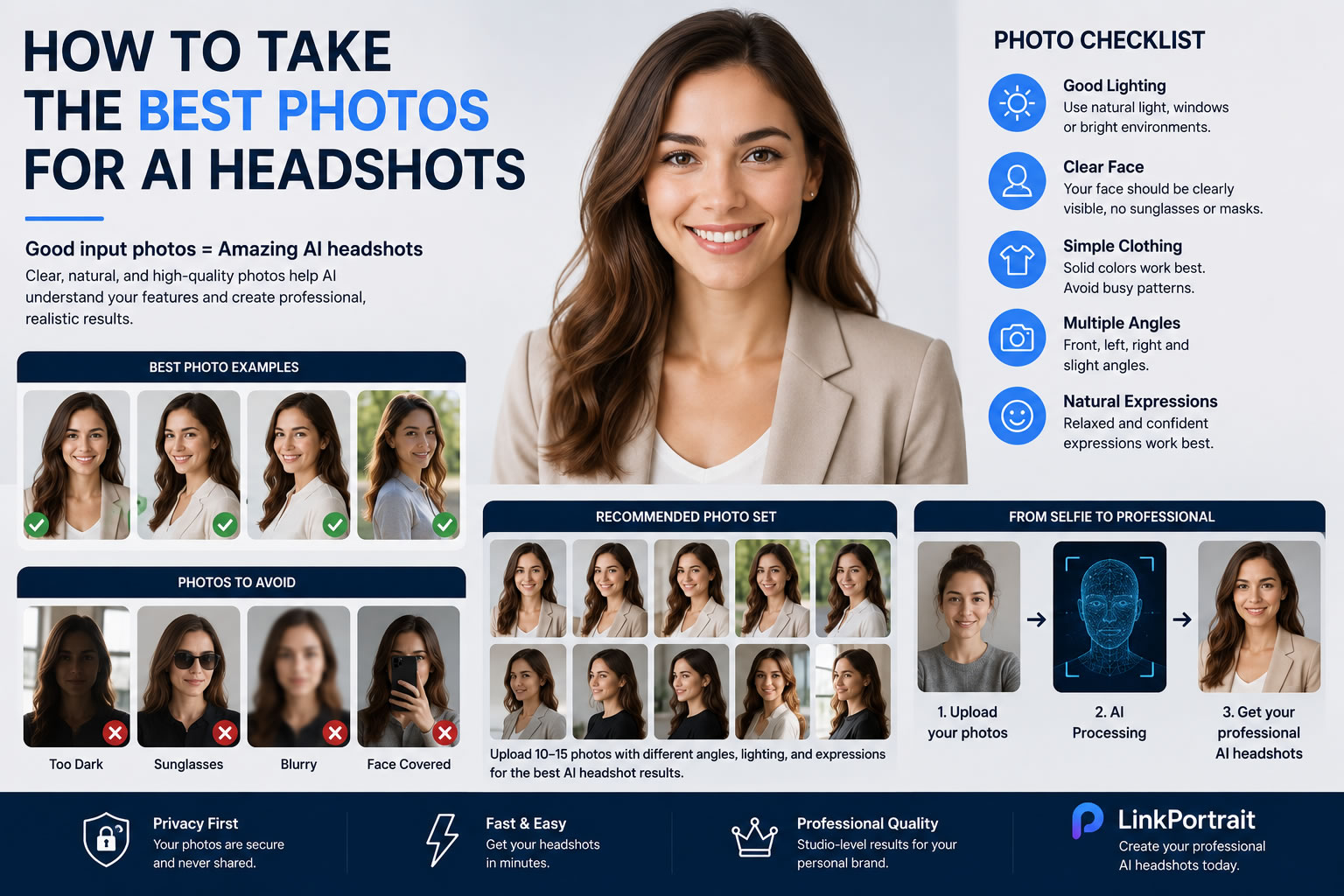
Your AI headshot quality depends on one important factor: the photos you upload.
Modern AI headshot generators can transform simple selfies into professional business portraits, LinkedIn photos, and personal branding images. However, even the best AI tools need good reference photos to create realistic and natural results.
Many users think AI headshots are only about the technology, but the input photos play a major role in the final quality.
In this guide, we will explain how to take the best photos for AI headshots, including lighting, angles, expressions, clothing, backgrounds, and common mistakes to avoid.
Whether you need a LinkedIn profile photo, professional business portrait, or personal branding image, these tips will help you get better AI-generated results.
Why Your Upload Photos Matter For AI Headshots
AI headshot generators analyze your uploaded images to understand your:
Facial structure
Skin tone
Hair style
Face shape
Natural expressions
Unique features
The AI uses these details to create new professional portraits.
If your input photos are low quality, blurry, heavily filtered, or taken from poor angles, the generated results may look less realistic.
High-quality input photos help AI create:
Better facial consistency
More natural expressions
More realistic lighting
More accurate professional portraits
Think of your uploaded selfies as the foundation of your AI headshots.
1. Use Clear Photos With Good Lighting
Lighting is one of the most important factors.
The best photos for AI headshots usually have:
Natural Lighting
Soft natural daylight works extremely well.
Good examples:
Near a window
Outdoor shade
Bright indoor environment
Avoid:
Dark rooms
Strong shadows
Flash reflections
Natural light helps AI understand your facial details more accurately.
2. Choose Multiple Angles
Do not upload only one selfie.
AI models perform better when they can analyze your face from different perspectives.
Recommended:
Front-facing photo
Slight left angle
Slight right angle
Different expressions
Avoid uploading:
Extreme side profiles
Photos where your face is partially hidden
Images with sunglasses
A good set of photos gives the AI a clearer understanding of your appearance.
3. Keep Your Face Clearly Visible
Your face should be the main focus.
Good AI headshot photos:
✓ Face fully visible
✓ Eyes clearly visible
✓ Natural expression
✓ No heavy filters
Avoid:
✗ Masks
✗ Large sunglasses
✗ Hands covering your face
✗ Strong beauty filters
AI works best when it can see your real features.
4. Use Natural Expressions
Your expression affects the final professional look.
For business headshots, try:
Relaxed smile
Confident expression
Natural posture
Avoid:
Extreme facial expressions
Forced smiles
Unnatural poses
A professional headshot should communicate confidence and approachability.
5. Wear Simple Clothing
Your clothing helps AI understand your preferred professional style.
Good options:
Business Style
Examples:
Suit jacket
Shirt
Blazer
Professional clothing
Business Casual
Examples:
Sweater
Polo shirt
Smart casual outfit
Avoid:
Very complicated patterns
Clothing covering your face
Extreme fashion styles
Simple clothing usually produces more professional results.
6. Upload High-Quality Images
Image quality matters.
Use:
Original camera photos
High-resolution images
Clear smartphone photos
Avoid:
Screenshots
Compressed images
Old blurry photos
Modern smartphones are usually good enough for AI headshots.
You do not need professional camera equipment.
7. Avoid Heavy Editing Before Uploading
Many people edit their selfies before uploading.
This can reduce AI accuracy.
Avoid:
Face reshaping filters
Skin smoothing apps
Beauty effects
Artificial backgrounds
AI headshot generators should learn your real appearance.
Natural photos usually create more realistic professional results.
8. Recommended Photo Set For AI Headshots
For the best results, prepare:
10–15 Photos
A good collection includes:
Front-facing portrait
Slight angle photos
Different lighting conditions
Different expressions
Different outfits
This gives AI enough information to create diverse professional portraits.
Common Mistakes That Reduce AI Headshot Quality
Mistake 1: Using Only One Selfie
One image provides limited information.
Result:
Less accurate facial details
Fewer realistic variations
Solution:
Upload multiple photos.
Mistake 2: Poor Lighting
Dark selfies make facial details harder to analyze.
Solution:
Use bright natural lighting.
Mistake 3: Too Many Filters
Edited selfies can make AI copy unrealistic details.
Solution:
Upload original photos.
Mistake 4: Low Resolution Images
Blurry photos reduce quality.
Solution:
Use clear smartphone camera photos.
Best Photo Examples For Different AI Headshot Styles
Different goals require different photo preparation.
LinkedIn Headshots
Recommended:
Clear face
Professional clothing
Neutral expression
Simple background
Goal:
Trustworthy and professional.
Business Headshots
Recommended:
Formal clothing
Confident expression
Clean lighting
Goal:
Professional authority.
Personal Branding Photos
Recommended:
Lifestyle photos
Different environments
More personality
Goal:
Show your professional identity.
How To Take AI Headshot Photos With A Phone
You do not need expensive equipment.
Follow these steps:
Step 1
Clean your camera lens.
A simple dirty lens can make photos look blurry.
Step 2
Use natural daylight.
Stand near a window or outside in soft light.
Step 3
Hold the camera at eye level.
Avoid very low or high angles.
Step 4
Take several photos.
More options help AI create better results.
What Makes A Good AI Headshot?
A high-quality AI headshot should look:
Natural
Professional
Realistic
Consistent with your appearance
The goal is not to create a completely different person.
The goal is to create a better professional version of yourself.
AI Headshot Generator: From Selfie To Professional Portrait
Once you have good reference photos, the process is simple:
Upload your photos
Choose your preferred style
Generate professional AI headshots
Select your favorites
You can create images for:
LinkedIn
Resume
Company websites
Social media
Personal branding
Final Tips Before Creating Your AI Headshots
Before uploading your photos, remember:
✓ Use clear images
✓ Use natural lighting
✓ Show your full face
✓ Upload multiple angles
✓ Avoid filters
✓ Choose realistic expressions
Better input photos create better AI results.
Create Professional AI Headshots From Your Photos
With the right photos, AI can help you create professional-quality portraits without expensive studio sessions.
Whether you need a LinkedIn update, business profile image, or personal branding photo, preparing your selfies correctly is the first step.
Upload your photos and create your professional AI headshots with LinkPortrait today.